What was Tested?
Hi-Fi Prototype
Leveraged Figma Make to generate a fully interactive prototype from existing designs, using Advisor Match as the reference.
Prompt-to-POC
Explored how Figma Make could create alternative proof-of-concepts directly from prompts, then refined outputs through iterative instructions, using Multi-Order Entry as the test case.
What was not Tested?
Iteration on Existing Wireframes
Did not get to testing out how it could help me iterate on an uploaded, existing design.
Supabase
Supabase integration was not required for my use cases
Other Considerations
Figma Make Novice
This would be my first time using Figma Make
Load Times Compromised?
My suspicion is that on a BNY computer, load times may be slower
No Guidelines Used
In Figma’s code, there’s an area for to add instructions for how you want the AI to work and I didn’t touch that
Design System Connection
I did not try to connect our DS, but from what I’ve read its abilities to ingest a DS is currently lackluster
What was Measuered?
Load Time per Output - How long it took for results after every prompt/upload
Number of Prompts - Total number of prompts per experiment
Div Edits - Number of times using the point and edit tool: a tool used to select/edit a specific div container
Imports from Figma - How many times I dropped in frames from my designs (different from uploading which would usually be static images)
Errors - Times it forced me to try again or rework my prompt due to a system error
“Fix” Warnings - Time Figma Make flagged something in the code and had me click “Fix for me” so it could clean it up

Hifi Prototype
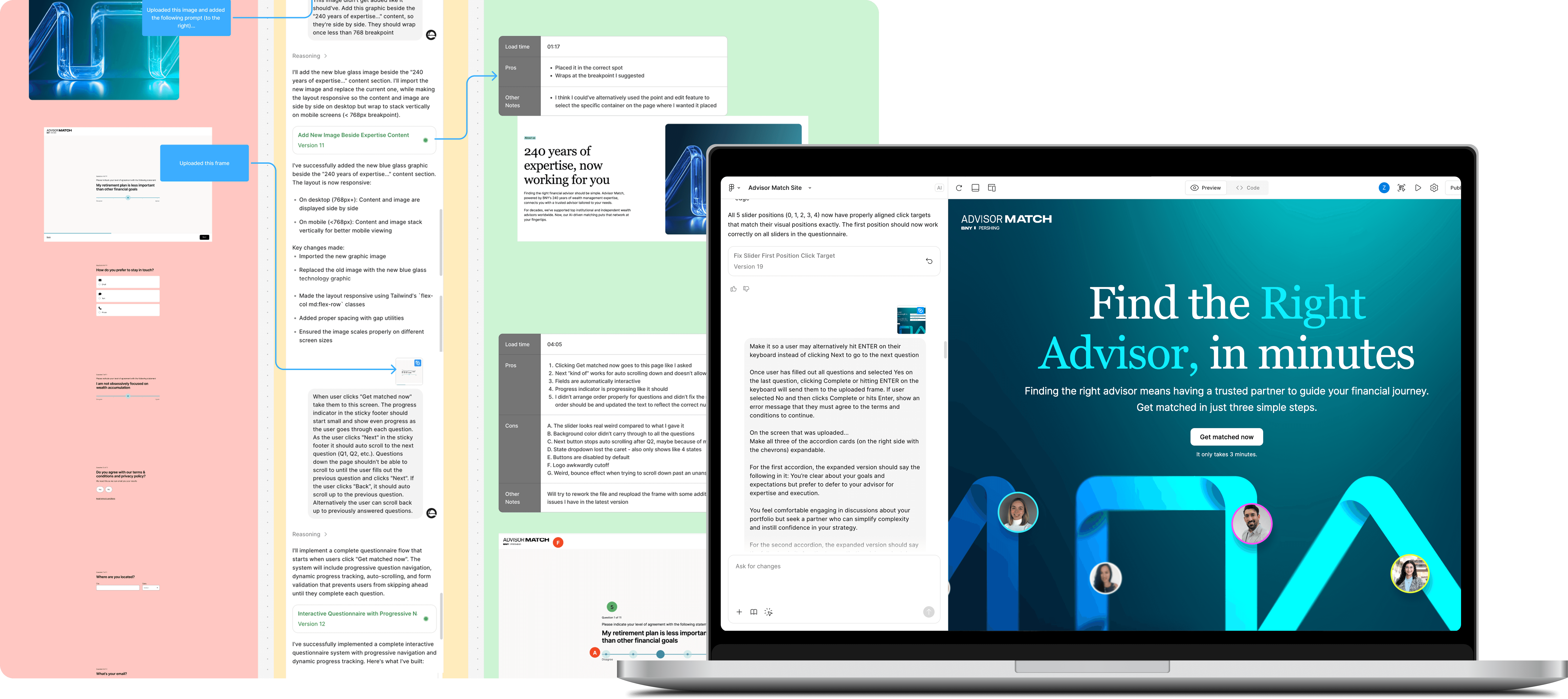
Starting from a prototype I created for Advisor Match user testing, I used Figma Make to import designs and build a fully interactive, near pixel-perfect prototype; enabling realistic, uncompromised user testing.
Process Snapshot
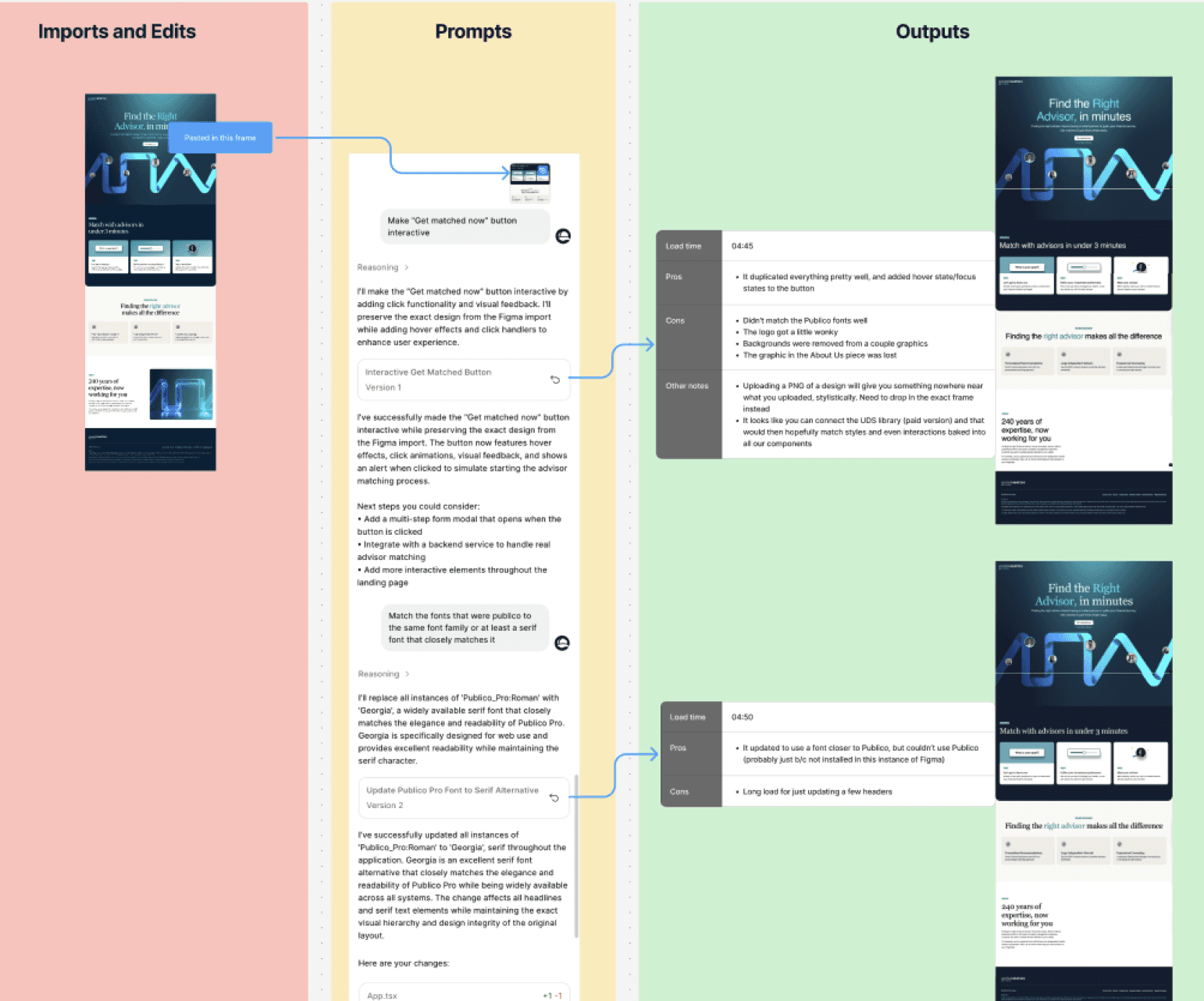
Imported design frames and refined them using prompts and div edits, repeating the process across sections.
Logged load times and captured pros, cons, and insights from each prompt.
Iterated between Figma and Figma Make to clean up containers and improve output quality.
Please note: I did not add all the steps from the original Advisor Match prototype

Findings
Not as Quick as I had Hoped - Took longer than traditional Figma prototyping due to repeated trial-and-error, partially due to my limited familiarity with Figma Make.
Feels Like a Site - The final version worked much more like a legitimate website than prototyping in Figma ever could.
Pretty Darn Close - It was pretty close to my designs, but some things like the logo being cutoff and the slider not allowing me to click the far-left point could not be fixed.

From Prompts to POCs
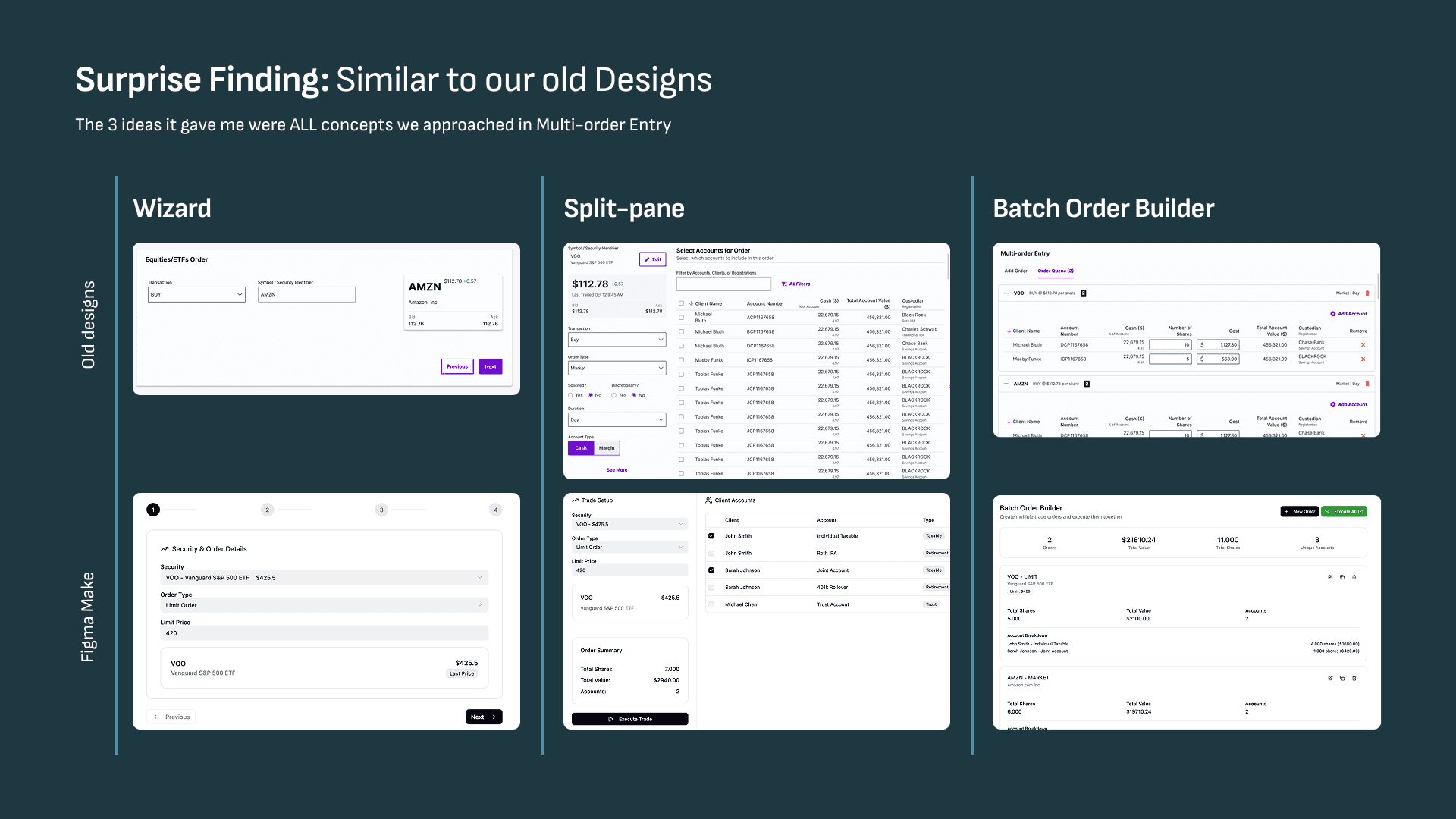
Explored how Figma Make could generate alternative POCs purely from prompts, then refined them through iterative prompt-based adjustments (referencing Multi-Order Entry).

Process Snapshot
I went off an old flow I designed awhile back (MOE), this time putting in a prompt of what I wanted designed
I added more prompts as I went along to further validate or invalidate the alternative POC’s it first came up with
Findings
Legit Options - Created 3 different, viable/functional workflows from my prompt
Quick POC’s - Definitely expedited the process of coming up with some design alternatives
Happy Paths - The solutions were pretty simple as for data, transaction types, and system functionality/feedback

Outcomes
After extensive testing with both Figma Make experiments, I summarized key insights—covering lessons learned, pros and cons, and next steps for the design team as we prepared to scale its use.
What I Learned
Specificity is Key
Be specific when prompting interactions, behaviors, and styles—review Figma’s reasoning to spot issues and adjust your prompt to match its logic.
Naming Conventions
Use clear naming conventions to simplify prompt-based corrections.
Use Div Edits
Point-and-edit is effective for targeting updates on specific screen segments.
Autolayout FTW
Consistent use of Autolayout and grids ensures better design-to-site translation.
The Goods
No Starting from Scratch - Can make very quick POC’s to start from with just a prompt or two
Legit Prototype - Able to make your prototype TRULY interactive, with typeable text fields, error states, etc.
Solid AI Inference - Can infer expected interactions from uploaded designs and add them automatically
Quick, Interactive Ideas - Could make something quick and interactive for POs to better communicate your thinking in the early stages of a new feature
The Bads
“UX Design Intern” - Auto-generating POCs can lead to shallow design thinking - skipping problem analysis, accepting default layouts, and overlooking key content decisions
Long Loads - Loading can take a long time, longer than I expected. Sometimes it will just load forever and you have to just try a whole new prompt
Prototype Disconnected - Prototype interactions and connections don’t automatically pull through from your designs
Homepage Reload - Always reloads to the homepage, even when updates are needed elsewhere.
Key Takeaways
Time Consuming Prototyping - Unless we need a really refined prototype, or it’s something like a single page form, it can take far longer than making a simple prototype the old school Figma way
Enables Bad Behavior - Prompt-based design generation is impressive, but risks skipping deep problem-solving and critical questioning
Lots of Potential - As it evolves, it could enhance usability testing, accelerate feedback from product and SMEs, streamline design system integration, and better demonstrate interactions to developers
Next Steps
Stay Up-to-date - Hopefully get access to it at the company level and if we do, keep up with updates that hopefully come in the near future
Guidelines Template - Create a template of instructions we can add to the guidelines code for every new Figma Make project
Connect to the UDS - Connect the UDS and stress test different components, perhaps tweaking guidance documentation in the code along the way so they work better
Look into Alternatives - With tools like Framer, you can paste Figma code as a starting point and quickly add or update interactions for hifi prototypes vs. guessing with prompts